KADUNA, Nigeria (AP) — By the time she ran away, she bore the scars of an abused woman anywhere - a swollen face, a starved body, and, barely a year after her wedding, a divorce. But for Maimuna Abdullahi, it all happened by the time she was 14.
Maimuna is one of thousands of divorced girls in Nigeria, who were forced into marriage and have since run away or been thrown out by their husbands. They are victims of a belief that girls should get wed rather than educated, which led
Boko Haram terrorists to abduct more than 200 schoolgirls two months ago and threaten to marry them off.
"I'm too scared to go back home," Maimuna whispers, as she fiddles nervously with her hands. "I know they will force me to go back to my husband."
Her former husband, Mahammadu Saidu, 28, does not deny beating her, and blames her few years of school for her disobedience.
"She had too much ABCD," he says. "Too much ABCD."
Nigeria has one of the highest rates of child marriage in the world, despite a law that sets the age of consent at 18. The custom of child marriage is still ingrained enough that even a federal senator has married five child brides and divorced one.
Across the country, one in five girls marry before 15, according to the United Nations. In the poor Muslim north, where child marriage is often considered acceptable under shariah or Islamic law, that number goes up to one in two. Some child brides are as young as 9.
There are no official numbers for just how many of these girls get divorced, leaving them destitute, but they are all too visible. A few miles away, girls Maimuna's age and younger are selling their bodies to truck drivers.
"Nobody knows how many thousands of them there are," says Saadatu Aliyu, the founder of a private school for divorced girls that Maimuna now attends. "That's why we have so many prostitutes, and very young ones, in the north."
At 45, Maimuna's father, Haruna Abdullahi, has been married for 30 years and has fathered eight children. He says his culture allows girls to go to their husband's houses from the age of 12. His wife, Rabi Abdullahi, was a child bride, although she does not know exactly how old.
"It is our way of life," she says. "In my day, a bride would never dare to run away."
In this desperately poor region, a child marriage brings in a bride price and means one less mouth to feed. So in late 2012, Maimuna's father arranged to marry his eldest daughter to his best friend's eldest son. The son, Saidu, paid a dowry of $210 — more cash than Abdullahi has had in his life.
She was 13, he twice her age. Saidu, a farmer, says he waited years for Maimuna to reach what he considers marriageable age.
"When she was a kid, I would bring her candy and call her 'wifey,'" says Saidu, who cannot read or write. "We were always meant to be together."
Maimuna begged her father to let her stay in school, but her wishes were not up for discussion. The link between child marriage and education is clear: Only 2 percent of married girls in Nigeria go to school, compared to 69 percent of unmarried girls. Three out of four married girls cannot read at all.
Many of Maimuna's friends from school were already married, and not one was happy. She got no advice, on warning of what to expect from the marriage bed.

She settled into a new life where she worked in the fields, cleaned, carried water and firewood and cooked. Every day she was exhausted, and when she finally got to bed, her husband wanted to "bother" her, she says. He never kept his promise to let her go to school. When she objected to her treatment, he locked her into their hut, for days.
Nine months ago, she fled to her father and begged to return home. Instead, he whipped her until her back was raw, then forced her to go back to her husband.
Saidu, humiliated and furious, slapped her repeatedly in the face. She fled once again, first to a sympathetic aunt and then to a cousin in Kaduna.
When Maimuna showed up at the Tattalli Free School for divorced girls, she had been badly beaten and refused to speak, says teacher Victoria Dung. Doctors found she was badly malnourished. The whip marks on her back may last a lifetime.
Her husband waited three months to make sure there was no baby. Then he divorced her. Under shariah law, a man can get divorced by declaring the divorce aloud three times.
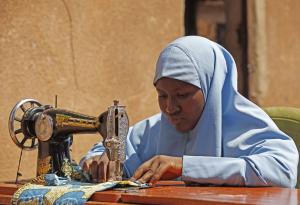
In this Saturday, May 31, 2014 photo, Maimuna Abdullahi sews clothes during class at her school in K …
Maimuna considers herself among the lucky ones because she is back at school.
"I pray that what I have done will help the younger ones, that my parents learn from the experience of my running away from home," she says.
It is by no means certain.
Maimuna's father denies beating his daughter, and says he is happy she is getting educated. Yet he gets visibly angry when he describes the financial problem she has left him.
Saidu is demanding his money back, because he wants to look for another bride. But Abdullahi has already spent it on land. Asked if he will treat his five younger daughters differently, he looks down at the ground.
"I would allow my daughters to go to school if I had the money. I have seen what happens, otherwise," he says. "But my reason is poverty, always financial problems. What can I do but give them out in marriage?"
Saidu, in the meantime, says he will move ahead with his life.
"This time I will marry a girl of 12, so that she will do what I want to do," he says. "Because if you marry a girl who is older, then she will not listen to you."
His eyes slide to the porch, where Maimuna's 10-year-old sister, Hafsat, is cuddling a neighbor's baby. A sly smile curls his lips.